Data we delete or anonymize
- Account profile and sign-in information
- Viewing history, favorites, and other in-app activity
- Device identifiers and account-linked preferences
- Coins, bonuses, and other virtual account benefits
SoReel Account & Data
You can permanently delete your SoReel account and the personal data associated with it at any time. This page explains how to request account deletion for the SoReel app published by SoReel Studio.
View deletion stepsAccount deletion is permanent and cannot be undone. You will lose access to your profile, viewing activity, saved content, coins, bonuses, and other account benefits. Deleting the app does not delete your account.
Delete in the SoReel app
Make sure you are signed in to the account you want to delete.
Open SoReel, select Profile in the bottom navigation, then tap Setting.
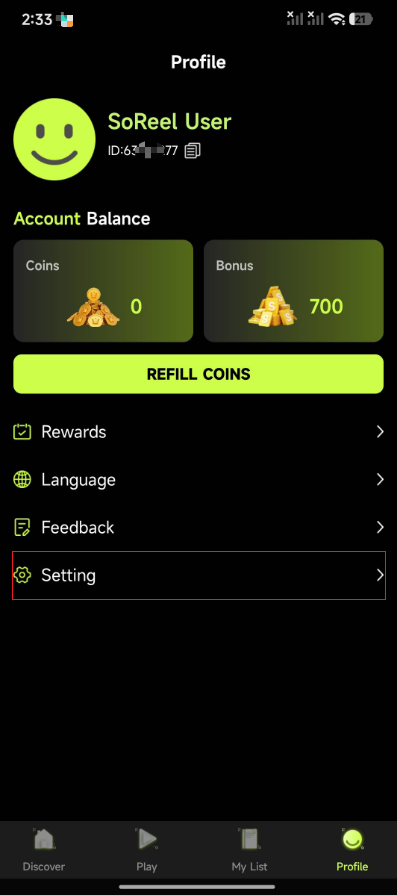
On the Setting screen, tap Cancel Account to open the account deletion notice.
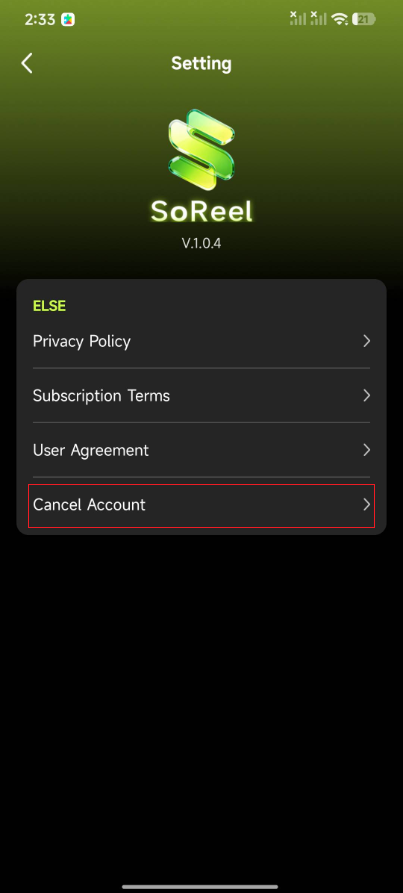
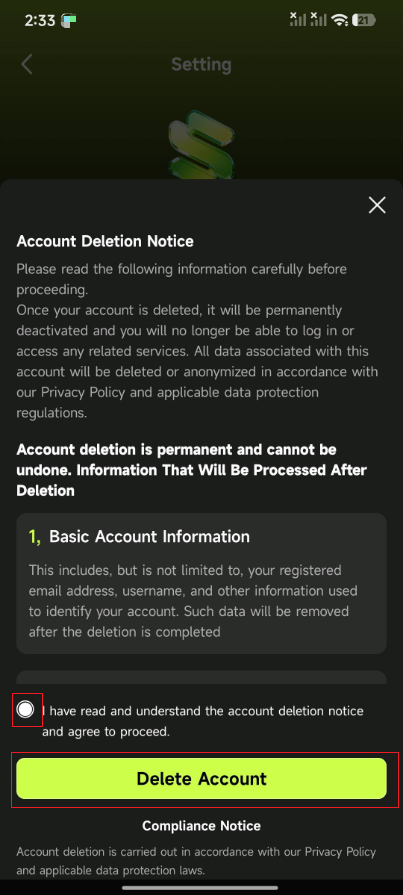
Read the notice, select the confirmation checkbox, and tap Delete Account.
Cannot access the app?
Email us from the address linked to your SoReel account. Include your SoReel user ID, if available, so we can verify and process your request.
Email deletion requestWhat happens to your data
We aim to complete verified deletion requests within 30 days. Some residual copies may remain in encrypted backups for up to 90 days before being overwritten. Information that must be retained by law is kept only for the legally required period and remains protected.